Friday, February 14, 2014

23 Mobile Things -- Thing 7 : Content Saving & Sharing

For Thing 7: "We all save things we find on the web--ideas, essays, pictures, blogs, news sites, whatever strikes our fancy. The traditional way to save things is with bookmarks in a browser--or many bookmarks in multiple browsers. This is great if you only use your desktop or laptop, but many people now have multiple devices with different browsers and probably different bookmarks on each. How do you find all those great sites when you are on any of your devices?"

Pinterest
I've had a Pinterest account for awhile that I setup via PC. I didn't dive right into Pinterest for two reasons -- One, I'm already heavily-vested in too many other social networks that I didn't feel I needed or could handle more "fun things" bombarding me. And two, after trying it for awhile I wasn't too pleased with it. For example: I'd saved "aka pinned" a item and then I went back just a day or two later to that pin and the content was gone. The pin still showed on my board -- picture and all -- but the linked information was no longer available. Yes, I know this happens all the time and it can happen via any bookmarking system. I guess in my naivety I thought maybe Pinterest had come up with a way of actually capturing/archiving the content for future viewing -- not so. So I use it for ideas & that's about it. jd-Points

Bitly
For years I've already used TinyURL but they don't have an app. So I thought about Bitly, their app, and how I might be able to use this for our Library. 

Using Bitly I could save & share our oh-so long library links in a shortened form. Some links are long because they either go through our proxy or they display the full folder hierarchy address. Shortening is awesome because it eliminates the possibility of link address breakage. jd+Points

Here's a snip of some of the links I shortened via our iPad using the iPhone app (no iPad version app at this time but this worked just fine):


Another Bitly option is to "Bundle" shortened links. So I took some of our most used links -- like several of our most used databases -- and I bundled them together to provide one link to multiple resources.

This snip shows our "databases" bundle:


Sharing a bundle? Here's a snip showing the options for how easy it is to share: 


Yes, this has provided me with some good ideas for easily sharing our Library links. jd+Points


Friday, February 7, 2014

23 Mobile Things -- Thing 6 : Creating & Editing Documents

For Thing 6: "When it comes to creating and editing documents, most people would probably still say they prefer using a computer over a mobile device. But there are some apps out there that are making creating and editing documents a little bit easier ... use at least one of these apps and create or edit a document." 


CloudOn
I decided to try CloudOn with our library iPad. Since we usually work from PCs with the Office Suite I thought this might be a good app to test. At times I use our library iPad out in the stacks on various projects and often I need an Excel file. In the past I've just put the Excel file in our Google Drive and used it via this. But this hasn't always been the easiest to work with when dealing with a larger spreadsheet. There tends to be a delay in scrolling or you don't always know if you're really in the correct field -- not good if you're entering or updating data.

I created a CloudOn account for our library:


This was very straight-forward and easy.

Light bulb tip: 


Files available from our Library's Google Drive:


File that I selected to work with:


In edit mode:


After saving, I was given the option to add an editor or mail the file:


After saving it displays "edit" information:


Overall this app seemed straightforward and easy to use. I'm going to give this more of a test-run with high hopes. Being able to easily work across platforms and software with ease is definitely a plus. jd+Points


Tuesday, February 4, 2014

23 Mobile Things -- Thing 5 : Note taking

For Thing 5 we were to consider: "Phones and tablets come with a notetaking app, but it’s usually pretty bare bones, and notetaking is why a lot of people like mobile devices. There are so many other notetaking apps out there, some that let you write with your finger, some that record your voice, and some that can help you make lists. Check out some of these popular apps."

Yes, I admit that I've used the plain-jane notes app on my iPhone. It does the job. But just an okay job so I don't use it very much or very often. I have less than a dozen notes most of which have simple information I like to keep with me on the off chance that I see that perfect something for a room or the cabin etc. such as window measurements or room dimensions.

I've tried using the notes for larger lists such for grocery shopping. But I find this not to be the best simply because I can't easily check or mark something off my list as I go. My only options are to leave the item or to take the time to delete the line. No, not happening. 

Earlier on I tried at least one other app but ran into the same problem -- not easy to mark off an item like I would on a paper grocery list or to-to list. So with this activity I am on the hunt to look at some of the suggested apps to see what they offer and how I might integrate them into my life.

Springpad
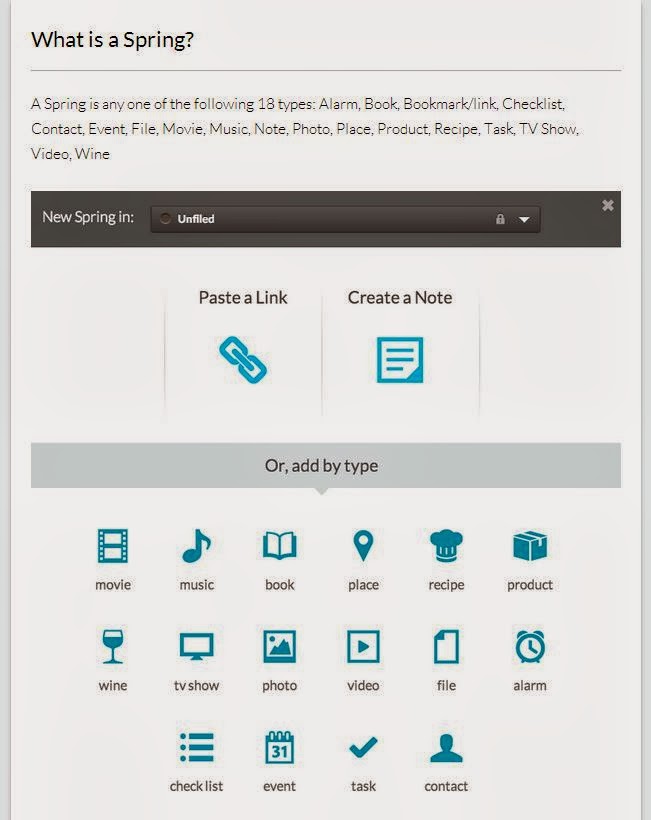
Right off the bat, Springpad shows promise of maybe being that Holy Grail of multi-function, multi-platform organizing apps. Here is a snip of what a "spring" is:

A Spring is: Alarm, Book, Bookmark/link, Checklist, Contact, Event, File, Movie, Music, Note, Photo, Place, Product, Recipe, Task, TV Show, Video, Wine
I like that Springpad can be used across platforms -- on my iPhone, iPad, and via the web (I'm often on multiple PCs) -- with snycing built-in. jd+Points right there.

I looked over their Support page to get a feel for what else Springpad can do & how I might use it. While I don't think that I'll use its social feature, I might like to use it for collaborating on occasion -- such as working with G on our Annual 4th of July get-together for creating and keeping updated on on food, people, needed supplies etc. I see that for Android (not yet Apple) there is an option to add a PIN to secure access to your notes. That could have its advantages -- top-secret Christmas lists and all.

Another feature that I might try is their Web Clipper tool. I currently do this a variety of ways depending upon if I'm on my iPhone, iPad or PC. This would do away with that plus keep everything in one place. jd+Points.


The test
I created an account via the web and added a few quick notebooks. I then downloaded the app to my iPhone. So far so good. I'll continue to work with this and try some of its other features but on quick review I think I'm going to like and use Springpad. 


Other apps mentioned
Bamboo Paper -- At this time I'm not going to try this app. I don't think I have a need for being able to sketch or draw with my finger -- I already have other apps for this, including a note taking app. I think this one is more for the creativity.
Dragon Dictation -- I have this app already but I've not used it other than an initial try it when I 1st downloaded it. I'll continue to keep the app and possibly in the future I'll find a good use for it. 
Remember the Milk -- I downloaded & tried this when it 1st came out but it wasn't for me. I've since deleted the app.