Showing posts with label apple. Show all posts

Friday, April 25, 2014

23 Mobile Things - Thing 15 : Infographics

Thing 15 "Infographics are … great for visual people, people who want to see graphics and statistics in more appealing ways than just a paragraph of words."

Not knowing exactly what I'd create an infographic for or why, I searched for some examples of library related infographics and found a few that I could use as inspiration in my library. Here they are and why I liked these:


This one grabbed my attention-- I liked the colors and graphics. The old style "librarian" glasses with what librarians do today make the information interesting. It's kind of comic style so I think this would grab the attention of students especially. 


source: http://yourteacherlibrarian.wikispaces.com/file/view/librarians.jpg 

This was another good example to explain what librarians do-- how we help our patrons/users. I liked the use of the road thinking of it as how to use libraries going down the pathway of life. 


source: http://media-cache-ec0.pinimg.com/236x/8e/71/2b/8e712b58c343440de6b3aea25b52e93a.jpg 


This infographic is a cool use showing book stats. Sometimes just giving a number without anything to compare it to doesn't do the trick. People understand the Grand Canyon is deep so for the stack of books to be double that, well that's a lot of books!


source: http://m1.behance.net/rendition/modules/41964527/disp/ae1b603261c61acc360272f05e9da307.gif 

Here's a good example to explain to younger patrons/users how we found library books before the computer age. It has an old-school feel to it so I think it's appropriate for the content. For older users, who grew up using library card catalogs, I think I'd add to it (or create a similar one on) how to conceptualize that same information in online (OPAC) format. 


source: https://blogger.googleusercontent.com/img/b/R29vZ2xl/AVvXsEjqnpYq7CY_DokeLslwq84qw5a7TduMkcHS34ruDJPJ6tNTdtJ6A75ErKjPocW4PvnwcJG6PWO1K2xgNYk2nMK4b5zUgj6gC6odKPUgrRvfVqsXbuDG9uX26w4r8fbzTP02ZJgHhqF7hm-A/s1600/peabody+visual+aids+1.jpg 

This is a simple infographic that shows the stats and circulation story over a few years. Much easier to look at quickly and see changes (either up or down) in the various library items.


source: http://andymorton.org/wp-content/uploads/2010/03/bml-stats-graphic.jpg 

This is a nice example of how to research in an easy to follow format-- although I'd make changes to it by adding our library resources such as our OPAC and databases. I could see where younger kids might like this one since it's kind of board game-like in format. 


source: http://langwitches.org/blog/wp-content/uploads/2008/12/kvl-300x212.png 

We're just now in the process of surveying our library users so I can see using this format (or similar) for sharing our survey results after they're compiled. 


source: https://blogger.googleusercontent.com/img/b/R29vZ2xl/AVvXsEjMU-SBT6msKRULurKD17Of3rIEfbabd2AlSg2WvkNhjJ6a99Rqe5MGCPrlbZD8UzPPH-r18S5O47M45M4aj99Hp9DfrYmNCk0lhX-OEjXdD3yhM4lSVQAZI_fT16LzbYXfq0WrcALn7sw/s1600/2012+Liberary+Survey+Results.jpg 

Creating infographics--
In creating our own infographics, I think I'd be most apt to check out & try i Visual Info Touch Lite using our iPad. If not mobile, then I might try Piktochart free via PC-- free version since I don't foresee me having numerous ideas or time for creating infographics. 


Tuesday, February 4, 2014

23 Mobile Things -- Thing 5 : Note taking

For Thing 5 we were to consider: "Phones and tablets come with a notetaking app, but it’s usually pretty bare bones, and notetaking is why a lot of people like mobile devices. There are so many other notetaking apps out there, some that let you write with your finger, some that record your voice, and some that can help you make lists. Check out some of these popular apps."

Yes, I admit that I've used the plain-jane notes app on my iPhone. It does the job. But just an okay job so I don't use it very much or very often. I have less than a dozen notes most of which have simple information I like to keep with me on the off chance that I see that perfect something for a room or the cabin etc. such as window measurements or room dimensions.

I've tried using the notes for larger lists such for grocery shopping. But I find this not to be the best simply because I can't easily check or mark something off my list as I go. My only options are to leave the item or to take the time to delete the line. No, not happening. 

Earlier on I tried at least one other app but ran into the same problem -- not easy to mark off an item like I would on a paper grocery list or to-to list. So with this activity I am on the hunt to look at some of the suggested apps to see what they offer and how I might integrate them into my life.

Springpad
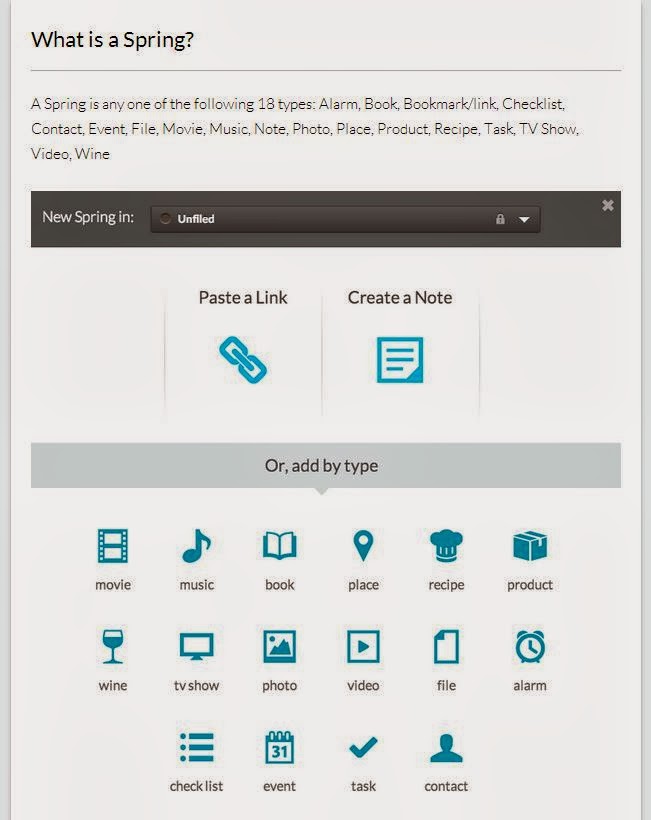
Right off the bat, Springpad shows promise of maybe being that Holy Grail of multi-function, multi-platform organizing apps. Here is a snip of what a "spring" is:

A Spring is: Alarm, Book, Bookmark/link, Checklist, Contact, Event, File, Movie, Music, Note, Photo, Place, Product, Recipe, Task, TV Show, Video, Wine
I like that Springpad can be used across platforms -- on my iPhone, iPad, and via the web (I'm often on multiple PCs) -- with snycing built-in. jd+Points right there.

I looked over their Support page to get a feel for what else Springpad can do & how I might use it. While I don't think that I'll use its social feature, I might like to use it for collaborating on occasion -- such as working with G on our Annual 4th of July get-together for creating and keeping updated on on food, people, needed supplies etc. I see that for Android (not yet Apple) there is an option to add a PIN to secure access to your notes. That could have its advantages -- top-secret Christmas lists and all.

Another feature that I might try is their Web Clipper tool. I currently do this a variety of ways depending upon if I'm on my iPhone, iPad or PC. This would do away with that plus keep everything in one place. jd+Points.


The test
I created an account via the web and added a few quick notebooks. I then downloaded the app to my iPhone. So far so good. I'll continue to work with this and try some of its other features but on quick review I think I'm going to like and use Springpad. 


Other apps mentioned
Bamboo Paper -- At this time I'm not going to try this app. I don't think I have a need for being able to sketch or draw with my finger -- I already have other apps for this, including a note taking app. I think this one is more for the creativity.
Dragon Dictation -- I have this app already but I've not used it other than an initial try it when I 1st downloaded it. I'll continue to keep the app and possibly in the future I'll find a good use for it. 
Remember the Milk -- I downloaded & tried this when it 1st came out but it wasn't for me. I've since deleted the app.